Your busiest night costs the same as a quiet one
Ten orders or ten thousand, the price does not move, and nothing is added to the guest's total.

 Live For websites NitroSites builds or hosts
For bars, cafes and restaurants
NitroOrders is table QR, pickup and delivery ordering for bars, cafes and restaurants, on your own NitroSites website. The kitchen screen, table tabs and ticket printing are included, one flat price covers every order, and nothing is added to the guest's bill.
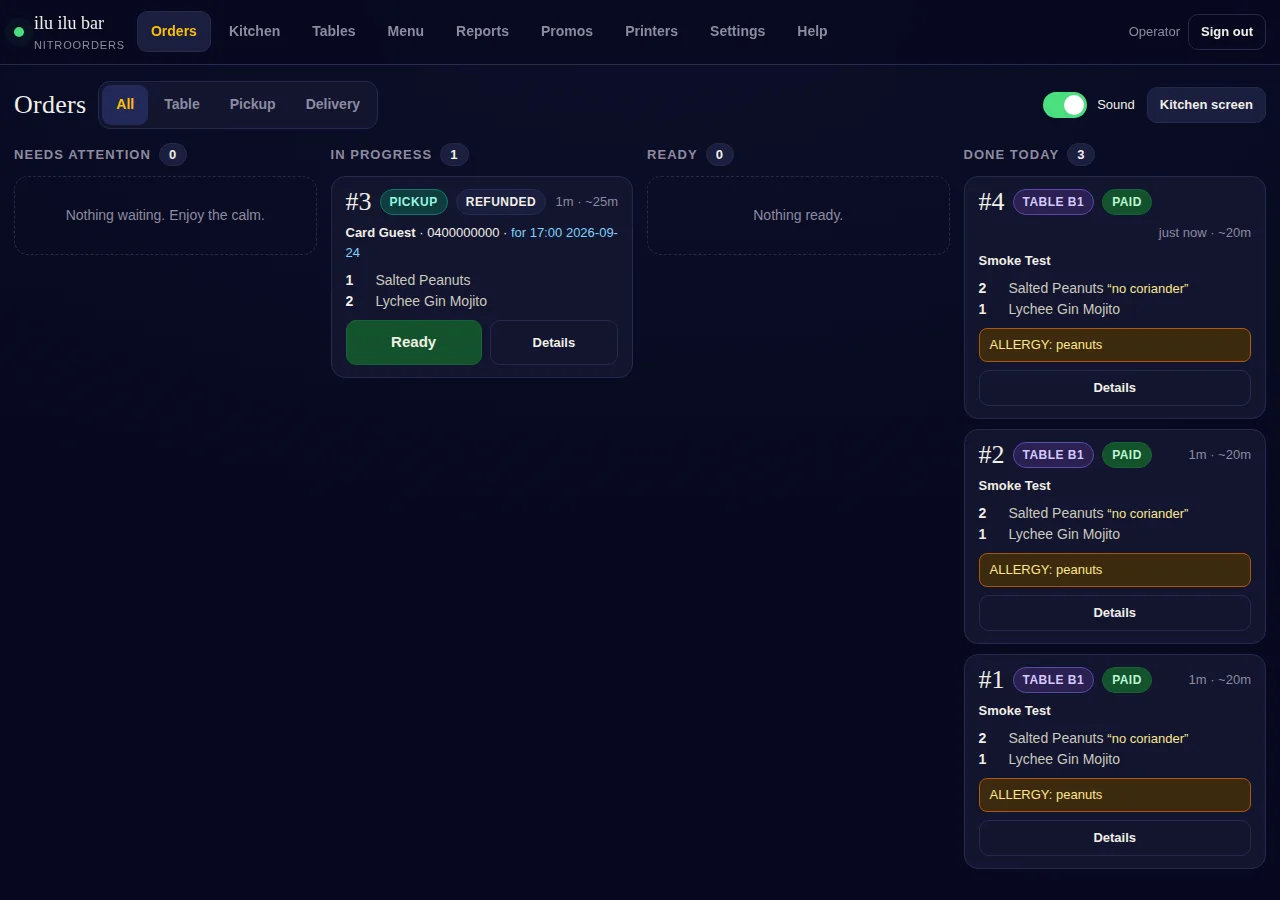
More of each order stays with the venue, and service runs on one screen.
Ten orders or ten thousand, the price does not move, and nothing is added to the guest's total.
The menu and checkout run on your own website in your design, so the brand on the guest's screen is yours.
Table, pickup and delivery orders land on one display and print as tickets, with timers that turn amber at 8 minutes and red at 15.
Guests pay now, at the bar, or run a tab and pay all, part or an even share from their phone. Staff settle the rest.
Shaped by a study of 28 ordering vendors and the complaints venues and guests make about them.
The 15 most common complaints in that study, from hidden checkout fees to weak kitchen screens, each map to a specific feature or rule.
61 automated checks place real orders through the whole system, alongside 23 unit tests and a full guest journey in a real browser, so the order path is proven rather than assumed.
The screenshots on our full NitroOrders page come from the running system, guest menu to kitchen screen.
NitroOrders is live and onboarding its first venues, so there are no venue results to show yet. We do not publish customer testimonials we cannot verify, and we will not invent them.
From a guest sitting down to a ticket printing in your kitchen.
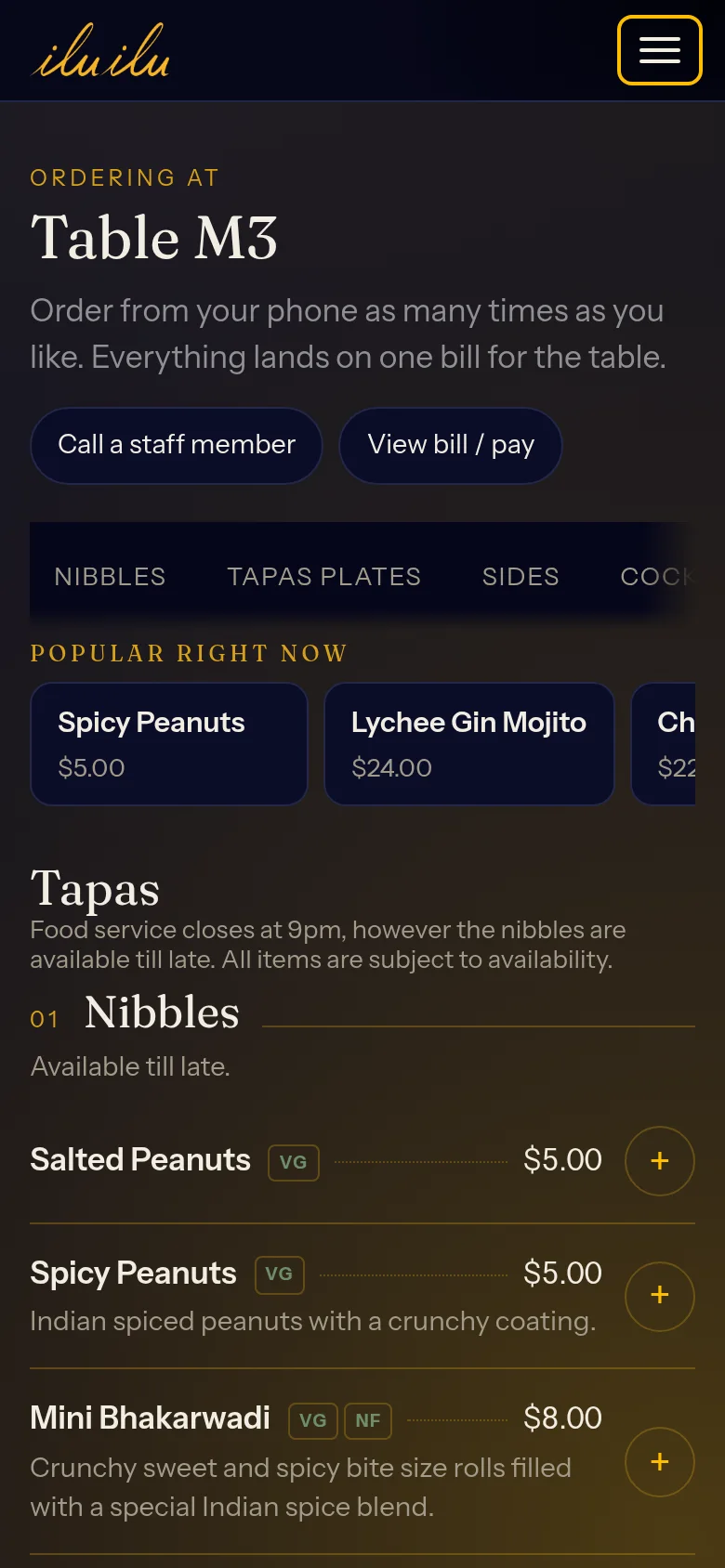
The guest scans the table's QR code, or orders from your website for pickup or delivery, with no app or account.
They add items and notes, answer the allergy question, and pay now, pay at the bar or add it to the table tab.
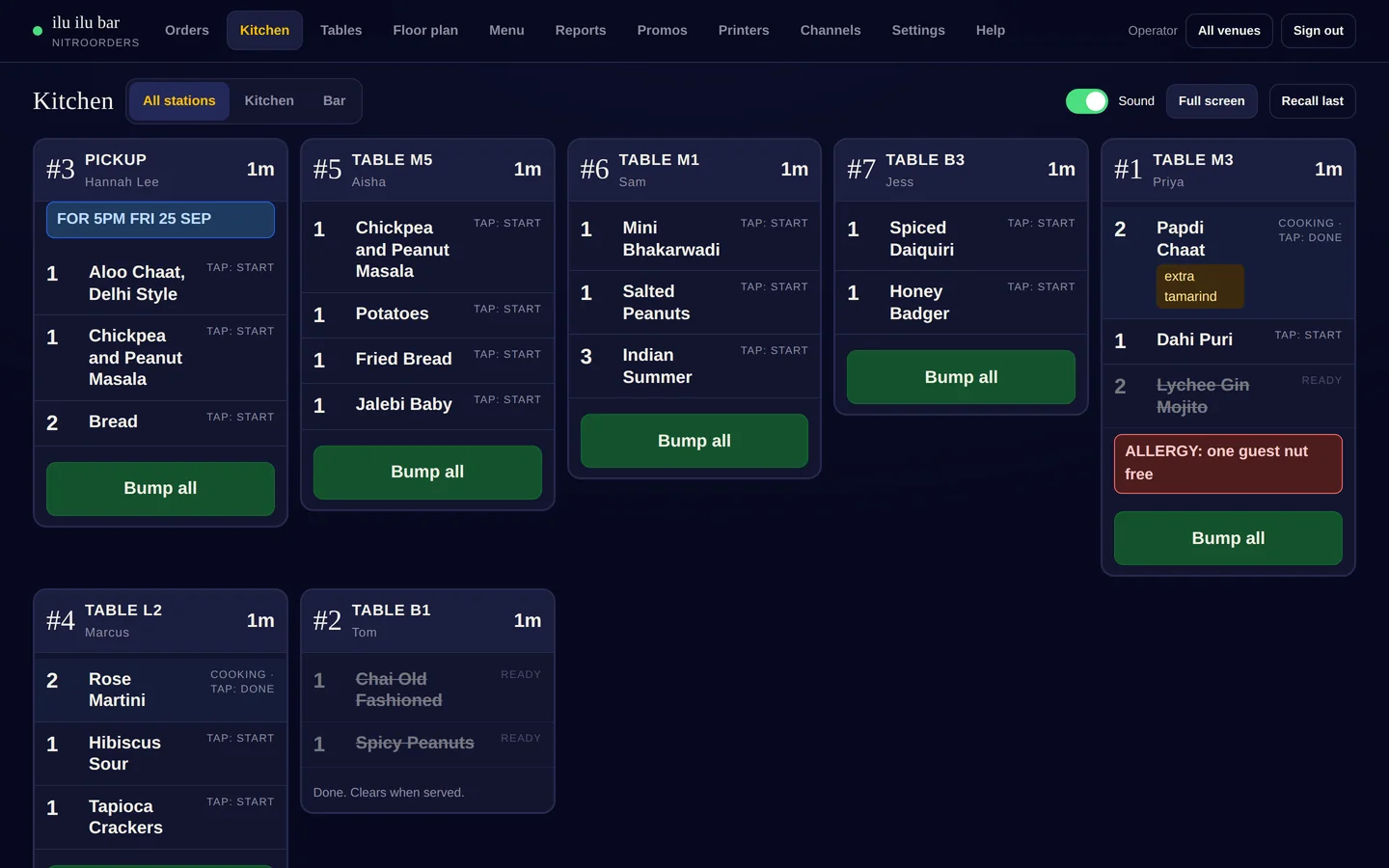
The order hits the kitchen display and prints a ticket. Staff bump each item, and the guest watches the status change on their phone.
Every feature below is in the one price. None is a paid module.
Each table's QR code carries its own secret, so a table number alone can never place or pay an order.
Lead times, opening hours, delivery zones with their own fee and minimum, a free-over threshold, and order-ahead slots so a closed venue still takes tomorrow's order.
Roll table orders into one tab that guests pay in full, in part or split evenly by people, from the phone.
Item-level bumps, station filters, timers, a chime and recall for a mis-bumped ticket, with an order ready once every station has bumped.
Star CloudPRNT and Epson Server Direct Print over the internet, a free bridge for any USB or network receipt printer, and stuck jobs requeued after two minutes.
Mark something sold out and it greys out on every guest's phone within 45 seconds.
Tip presets with "No tip" given equal weight, and weekend, holiday or card surcharges shown on the menu and itemised at checkout.
Guests watch their order go from accepted to preparing to ready on their phone, with no app.
A day report by order type, hour, tips, surcharges and discounts, plus promo codes, upsells and loyalty stamps.
Orders board, kitchen, a floor plan builder with printable QR sheets and menu editing, all from your client portal.
AISI inside
Guests ask AISI where to eat and order. Your menu page is built for AISI assistants to read, and NyXi keeps your setup questions moving.
Before launch we fetch your NitroSites website as each of OpenAI's three crawlers and expect a clean answer. AISI assistants can read the page your orders come from.
A question about your menu, printers or setup goes through the help desk in your client portal, where NyXi reads it and drafts the reply. A person at NitroSites sends it, so you get a quick answer from people who know your setup.
Every help-desk message translates in one click. Read our replies in your language and write to us in yours.
Judge the shape of the deal, not a brand name.
| What | Commission ordering apps | NitroOrders |
|---|---|---|
| Per-order cost | A percentage of every order | None: one flat $99 a month |
| Fee at checkout | A platform fee added to the guest's bill | None, ever |
| Where guests order | The app's branded page | Your own website, in your design |
| Kitchen screen | Often a paid module | Included |
| Printing | Their hardware, or none | The thermal printer you already own |
| Contract | Often 12 months or more | Month to month |
Every order is included, with no commission and no fee on the guest's bill.
NitroOrders
TABLE50Half price for 12 months, no setup fee
Normally $99 a month with the code for your first 12 months, then $99 a month.
per venue, every order included, no commission
Or $990 a year, paid up front (two months free).
$499 setup waived with this code.
Setup covers your menu build, table QR sheets, and printer and kitchen screen pairing.
TABLE50 is already in the box at checkout. No lock-in.
Allow about 5 business days from your menu and table count. Tax is added at checkout where it applies. Prices show in your local currency.
NitroOrders is live and onboarding its first venues. The working system runs on a demo venue today, so there are no venue results to show yet, and every new venue is set up and tested with you before guests order.
Cancel from your account any time, with no exit fee. Card payouts already sit in your own payment account, and ordering switches off on your site.
It does not replace your POS. Delivery-app orders can land on the board through an inbound link per channel, but full marketplace partner connections are scoped separately, and card processing is your provider's fee.
Real people at NitroSites, through the helpdesk in your client portal. Setup takes about 5 business days: menu built, QR codes printed, printer connected and your team walked through it.
Your venue. Card payments settle to your own account at your provider's rate, never marked up by us, and orders, tabs and day reports sit in your staff app.
NitroOrders charges one flat monthly price for every order, however many you take. No percentage, and no fee on the guest's total.
No. It prints to Star CloudPRNT and Epson Server Direct Print printers over the internet, or any USB or network receipt printer through the free bridge, and the kitchen screen runs on any tablet, phone or PC.
It runs on NitroSites websites, either yours already or a new one built around your menu. On another platform, ask us first.
Yes. A table tab can be paid in full, in part or split evenly by people, from each guest's phone.
TABLE50 halves the monthly fee for your first 12 months at checkout. We also waive the $499 setup for venues that start with it, at onboarding.
One login, one invoice, one support desk. Start with NitroOrders and add the rest when you are ready.

Table bookings on your own website. No per-cover fee.
$49 a month ·BOOK2FREE first 2 months free See NitroBookings 
A business website that brings in enquiries, live in days
from $1,490 one-off ·BUILD40 40% off a launch build See NitroSites Websites 
Robo-diallers stopped at the door. Every softphone rings at once.
$39 a month ·SWITCHFREE first month free, setup waived See NitroSwitch Use code TABLE50 at checkout: half price for 12 months, and the $499 setup waived. Setup takes about 5 business days.
Tell us about your venue. A real person at NitroSites replies within one working day to book a walkthrough on your own menu.